
A Smarter, More Secure Way to Support Your Business
At Readysell, we’re always looking for ways to improve the reliability, security, and cost-effectiveness of the services we provide to you.
As part of this commitment, we’re upgrading the remote support software we use to connect to your systems moving from TeamViewer to RustDesk.
Why the Change?
Due to significant increases in TeamViewer licensing costs, we’ve taken the opportunity to transition to a modern, secure, and more sustainable solution without passing any additional costs on to you.
What is RustDesk?
RustDesk is a powerful, open-source remote desktop solution that allows secure access to your systems from anywhere. It’s designed with a strong focus on:
- 🔒 Security and privacy
- 🌐 Reliable remote access
- 🏢 Greater control over data
This ensures we can continue delivering fast, efficient support while keeping your business protected.
What Does This Mean for You?
✅ No Additional Cost
There is no cost to your business for this upgrade. It’s part of our ongoing service commitment.
✅ Seamless Installation
We’ll take care of everything. RustDesk will be automatically installed on all machines running Readysell as part of our regular release process, no action required from you. On some machines, installation instead happens the first time you use the Remote Support option in Readysell, see below for what to expect.
✅ Rollout Timeline
The upgrade will begin over the coming weeks, with minimal to no disruption to your daily operations.
Security You Can Trust
Your security remains our top priority. With RustDesk:
- 🔐 All connections are end-to-end encrypted
- 🔑 All Readysell staff use Two-Factor Authentication (2FA)
This ensures only authorised personnel can access your systems.
Antivirus Compatibility
- If you’re using Readysell-supplied ESET Antivirus, everything will be pre-configured and ready to go.
- If you’re using other antivirus solutions (such as Windows Defender), you may need to add exceptions manually.
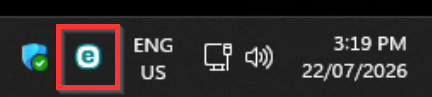
Tip: If you see a blue “e” icon in your toolbar, you’re already running ESET.
How to Know It’s Installed
Once installed, you’ll see a blue RustDesk icon in your toolbar.
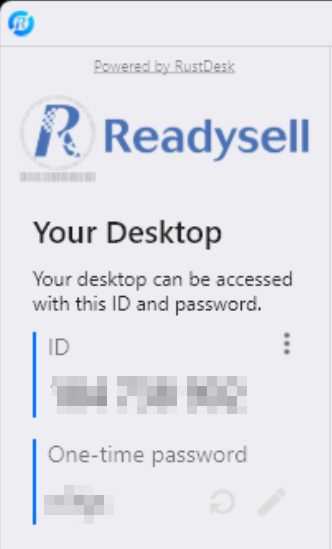
Simply double-click the icon to open the application, where you’ll find:
- Your unique ID
- A one-time access password

What About TeamViewer?
There’s no immediate change required.
- TeamViewer will remain on your existing machines
- However, all new systems will use RustDesk moving forward
Installing RustDesk via Remote Support
If your machine hasn’t already received RustDesk through the automatic rollout above, it will be installed the first time you use the Remote Support option inside Readysell. Here’s exactly what to expect so there are no surprises.
Starting a Remote Support Session
From the Tools ribbon in Readysell, open the Support menu and select Remote Support.
You only need to click this once. The first click launches a small installer to set up RustDesk automatically; after that, RustDesk is ready and waiting on your machine for future support sessions.
✅ You’ll See Two Windows Security Prompts
Because the installer needs to install software and configure it correctly, Windows will ask for permission twice. You may see prompts such as:
- 🔐 “Do you want to allow this app to make changes to your device?” for the installation itself
- 🔐 A second prompt for configuring RustDesk to run correctly on your machine
Select “Yes” on both prompts to continue. These are standard Windows administrator (UAC) prompts and are expected they simply confirm you’re allowing the installer to do its job.
If you’re not able to approve these prompts yourself (for example, on a machine managed by your own IT provider), please ask your administrator to approve them, or get in touch with our support team for help.
What Happens After
Once the two prompts are accepted, the installer finishes silently in the background there’s nothing further for you to do. No icons or windows need to be actioned, and you won’t need to read out an ID or password.
RustDesk is now ready on this machine for our support team to assist you in the future.
Important: installing RustDesk does not give Readysell unattended access to your machine. Each time our support team needs to connect, you’ll be prompted on-screen to allow the connection before we can see or control your desktop. Nothing happens without your approval at the time.
Why We Need Admin Access
Installing and configuring remote support software correctly requires administrator rights, this is normal for any tool of this kind (including TeamViewer previously). It’s a one-time step; you won’t see these prompts again once RustDesk is installed.
Questions?
If you see anything unexpected during installation, or you’re unsure about approving a prompt, please reach out to our support team before continuing
Supporting You Every Step of the Way
This upgrade allows us to continue delivering high-quality support while keeping your systems secure and your costs under control. If you have any questions or need assistance, our team is here to help.