News

Readysell Cloud Backup

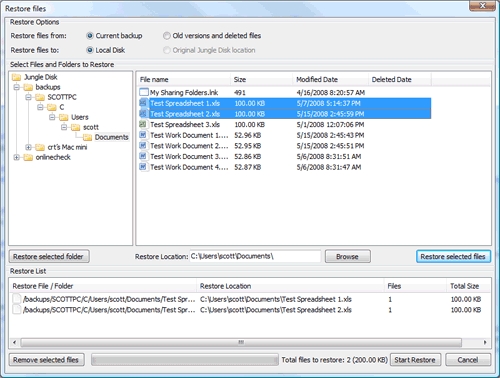
Thanks to advancements in online storage, Readysell is now able to offer a cloud-based backup solution running on Amazon’s popular S3 service. The new Readysell Backup service allows you to seamlessly, securely and automatically protect your company’s files against loss, theft, viruses, and natural disasters. It also allows you to access your data from any web browser, anytime, anywhere, securely with just a click.

For customers already taking advantage of this service, we have now configured automatic email for alerts for your backup using your primary email address. You will start to receive your daily reports shortly.

In addition, you should have already logged on to our website to download and installed the Readysell Backup Management console. This should be installed on your workstation so that at any time you can log in and make changes, add additional backup folders or just check your current backup status. If you do not have your username and/or password, please send an email to support@readysell.com.au to retrieve it.
Microsoft Security Essentials 2.0

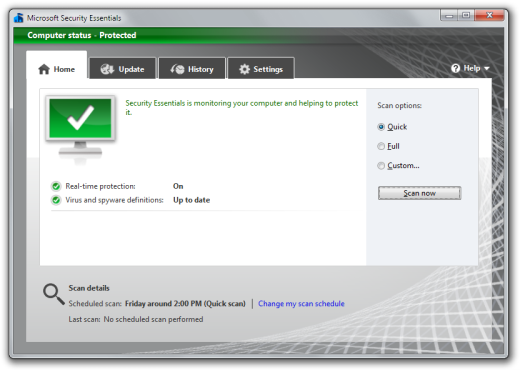
Late last month Microsoft released the second version of their award-winning and free anti-malware tool, Microsoft Security Essentials.

Microsoft Security Essentials (MSE) can be used for no charge on any Windows XP or Windows 7 computer in businesses with up to 10 PCs. If you fall into this category, we highly recommend MSE as an anti-malware solution.

Benefits of the new version include:

  • Integration with Internet Explorer for better protection against web-based threats
  • Network inspection to monitor local network traffic for threats
  • Heuristic engine to detect even more threats
  • Windows Firewall integration

If you are already running MSE version 1 on your PC, you will be automatically upgraded to version 2 via Windows Update. If you have a new PC you wish to install MSE on, uninstall any existing antivirus software and then go to this website to download and install MSE.

RObI Web Order Changes

RObI (Readysell/Office Brands Interface) version 1.2.4.0 was deployed to all stores late last week. This version contains a change that will potentially affect the way web orders are imported at your store.

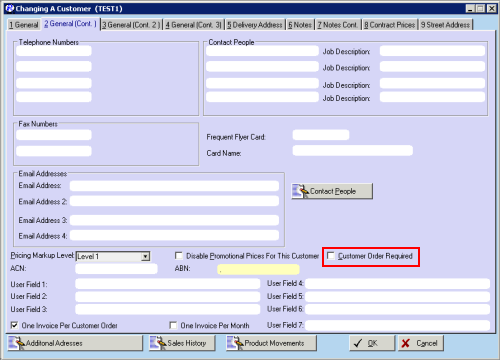
RObI now checks the “Customer Order Required” flag on your Readysell customer file (see screenshot below).

If a customer is flagged as “Customer Order Required” and does not supply a Purchase Order number number with their WebSphere Order, the order will be automatically held (i.e. placed into SALHLD status). This means the order will not print automatically (if you have this function enabled) and will instead need to be manually reviewed before it is processed.

Checking the OP23 Catalogue Data

Some members have reported that all customers are getting government prices after this catalogue has been loaded. Please follow the steps below to ensure your OP23 catalogue is correctly loaded.

  1. From the main menu, start the Products module
  2. On the Browse Products window, click the F5 Sales tab
  3. Click on the Promotions button
  4. On the Browse Promotions window, enter OP23G into the Search field
  5. Highlight the promotion OP23G and click on the Change button
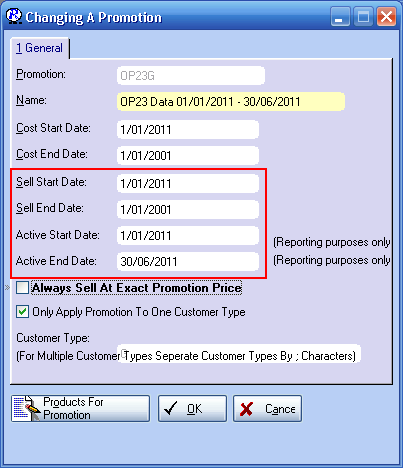
  6. Check that the Sell Start Date and Sell End Date is 01/01/2011
  7. Check that the Active Start Date is 01/01/2011
  8. Check that the Active End Date is 30/06/2011
  9. Click the OK button

Additional Data on Purchasing Screens

Additional product data has been added to various purchasing screens.

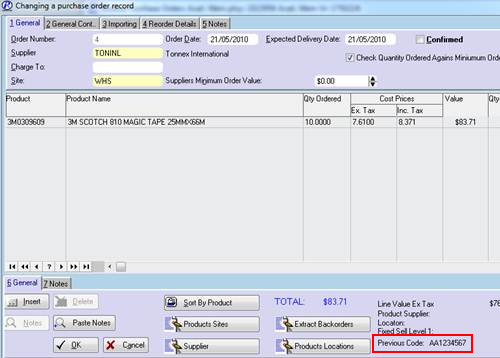
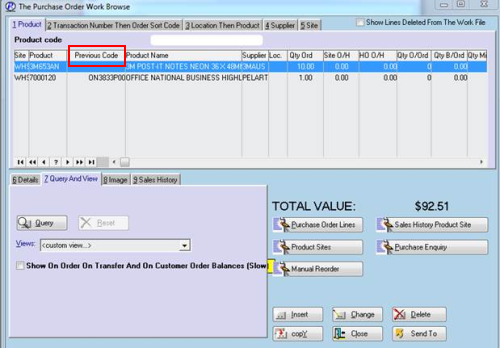
Now that all Readysell customers have now been transitioned to EzyCode, you may need to reference the legacy product code in some cases. You can find the legacy code in “Previous Code” field on the following screens.

Purchase Order Entry Screen

Purchase Order Work File Screen

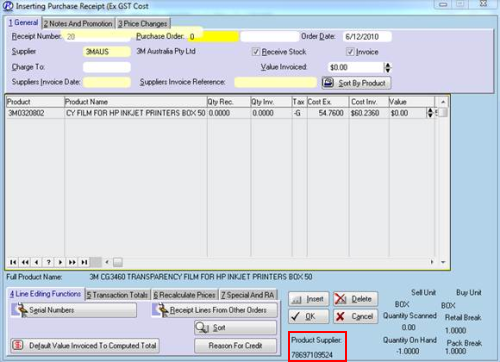
Additionally, we have added the Supplier Code to the following screen.

Purchase Receipt Entry Screen

Automatically Printing Devliery Dockets

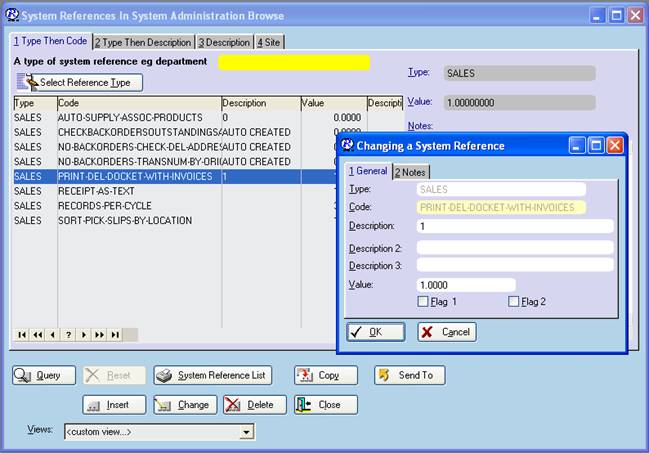
Readysell can now be set up to print an invoice formatted as a delivery docket after every sale. The system reference is type “SALE” code “PRINT-DEL-DOCKET-WITH-INVOICES”.

If you would like to use this feature, start sales to create the system reference. Then from system admin set the value of the system reference to 1.

For a full list of changes with the latest version of Readysell, please review our Release Notes under “Support Downloads” on our web site.

It’s that time of year again…

imageIt’s amazing how fast the year can pass us by. As another holiday season approaches, the management and staff at Readysell would once again like to extend their thanks and gratitude to their valuable customers for the continuing support over the last year. We wish you a very Merry Christmas and a safe and happy New Year.
The Readysell office will be closed this year from midday on Wednesday, 22nd of December, 2010 and business will resume on the Tuesday, 4th of January, 2011. As per our regular after hours service, Greg and John will be available during this period for critical support issues only.

We would like to send out a warm welcome to our new customers this year, welcome to the Readysell family. We hope that your transition to Readysell has been painless and we have made your business more effective. Thank you too to all of our customers, new and old, for your ongoing business, thoughtful feedback and continued support.

Best Wishes,
Greg, John, Adam, Diane, Dianne, Sharon, Sue & Tony

Release Notes

We would like to remind our customers that summarised release notes are available on our web site in the “Support Downloads” section under Readysell 7 > Release Notes. Going forward, we will be endeavouring to send more frequent notifications when new release notes are available.

We encourage all customers to check the release notes when they become available to see what new features and changes have been made to your system.

Loading the ED05 Education Flyer

We have had reports about incorrect sell prices from members who have loaded flyer ONED05. Upon checking with head office we have been advised that ONED05 is a Government Flyer. As a result it has to be loaded in a different way to a normal Flyer. Whether or not you have already loaded ONED05, the procedure below will result in loading of the correct prices for this flyer.

The replacement Flyers which will be deployed on Wednesday 01/12/2010 are named:

  • ONED05G – ONED05 Education Flyer 01/10/2010 – 31/03/2011 Gov (for Office National)
  • OPDED05G – OPDED05 Education Flyer 01/10/2010 – 31/03/2011 Gov (for Office Products Depot)
How to Load

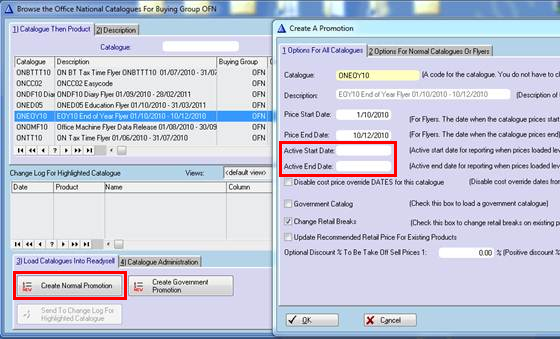
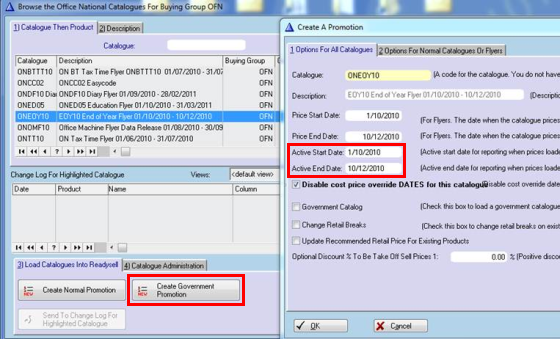
ONED05 – ONED05 Education Flyer 01/10/2010 – 31/03/2011 or OPDED05 – OPDED05 Education Flyer 01/10/2010 – 31/03/2011 should be loaded as you would load a normal Catalogue, however you will have to remove the active start and end dates.

Next you must load the ONED05G – ONED05 Education Flyer 01/10/2010 – 31/03/2011 Gov or OPDED05G – OPDED05 Education Flyer 01/10/2010 – 31/03/2011 Gov flyers as Government (like you would with a normal Catalogue), making sure the active start and end dates are active.