News

Readysell to WebSphere Contract Integration

After extensive testing at a number of pilot sites, Readysell is pleased to be rolling out the contract price integration component of RObI to all Office Brands members.

We are currently in the process of installing the necessary components on each server – this should be completed shortly. However, we will not be turning on this functionality at your store until the following prerequsites are met:

  1. You have read the relevant section of the Readysell-Office Brands Integration User Guide (available in the Support Downloads section of our web site). Contract price integration requires that you understand how the process works.  In particular, only certain types of contracts are being sent to WebSphere.
  2. You have deactivated or deleted any manually created contracts in WebSphere which duplicate your Readysell contacts (and hence create the potential for conflicts).
  3. You contact Readysell and confirm that you wish to have this functionality enabled.

We believe that this functionality can save you a great deal of time and effort and hope to have this running at your store as soon a possible. If you have any questions regarding the above process, please email adam@readysell.com.au or leave a reply on this blog post.

Readysell 8 is Coming

Readysell is presently working to produce a next generation ERP package that includes all of the features required in a best of breed ERP system. We are rewriting Readysell from the ground up to utilise the latest technologies software standards.

Outside of regular support, completing Readysell 8 is our core priority for 2010. As a result, as much as practical, we will not be adding new features to the existing Readysell 7 software. We will still be fixing bugs and supporting all existing Readysell 7 features as usual. We believe this is focus will be in the medium term interest of all members.

Below you will find a brief outline of some of the new features and improvements coming in Readysell 8. We are confident you will find value in what’s coming and are able to cooperate with us as we focus more of our attention at our upcoming product.

Latest Technologies

Readysell 8 is built using the latest Microsoft .NET technology. This provides Readysell with a clear technology path backed by the world’s most prominent software vendor.

Our development platform keeps the Readysell 8 business rules separate from the Windows and web technologies currently being used to deploy them.  As a result Readysell 8 currently has parallel versions for Windows and the web. In the future we will have additional versions utilizing the best emerging technologies.  The Windows version is most suitable to local workstations where it gives the best user experience. Sales reps and remote staff can work on the same system using the included web version.

Readysell 8 can be substantially standardized across the group and tailored for members without having to request program changes.  All the screens and reports can be redesigned using a drag and drop report and screen designers included in the program. Those changes can be made centrally and deployed to member’s systems.

Readysell 8 can run on almost any database engine. Our current database engine has also been upgraded to provide unparalleled transaction-based data integrity.

Extensive Service and Photocopier Module

Readysell 8 features a full service module. Our service module includes photocopier service, support and automatic billing. Meter readings and service requests can be entered in many ways. For example, customers can enter meter readings via the web.  Each photocopier can have any number of meters. Meter readings associated with each meter are retained as drill down history.  Readings are used to generate billing, schedule service jobs and to chase up missing meter readings. Warranty and service contracts are associated with photocopiers. Service jobs can be created for photocopiers or any other service work. Jobs track the goods they are waiting for as well as time and materials used.  Service billing and profitability reporting is automatically calculated for all service jobs.

The system monitors your service operations just like the rest of the business. Alerts are automatically generated and the relevant staff are emailed when actions are required. Such as when service is due, meter reading required, invoice generation overdue etc. Repeat requests for action are automatically generated for your staff in respect to all jobs that are late until the job is successfully completed.

Enhanced General Ledger

Readysell 8 features a simple yet powerful real-time General Ledger module. As any transaction is entered you can immediately drill up to the summary accounts. Accounts staff can also drill down on screen through daily summaries to the individual lines that make up each account posting. There is a transparent association of all financial summaries to their source transactions and all source transactions to their financial summaries. This gives an excellent real time audit trail with a high degree of usability and integrity.

Business Intelligence for Staff and Operations Management

Readysell 8 monitors the health of your business minute by minute. The system watches to see if something needs to be done. Like a product needs to be reordered, a low margin sale needs to be investigated or a shipment is overdue. It then lets the relevant staff know what needs to be done via email or a on screen notification. If they still don’t do the job Readysell can keep reminding them and inform management once a task too overdue. A operations dashboard shows the problems that are arising and being resolved in the business during the day. Keeping management and staff aware of the workflow for their area of the business.

Business health monitoring rules and responsibilities can be adjusted like any other data in the system. As a result rules to be deployed across the group to encourage best practice. Also allowing rules to be tailored for each member to suit local conditions.

Business Intelligence for Business Owners

Readysell 8 allows you to take tactical and strategic control of your business by giving you a Business Intelligence Dashboard. This window provides an overview of what is happening as it happens. The Dashboard shows all the key indicators for your business one page. Without needing any reports you can drill down into the graphics and charts (widgets) to identify the causes of problems and successes. Easy to understand colour coded graphics highlight areas of improvement and areas that need attention. There will be a list of key indicators which will be deployed out to customers as standard dashboards. You can also then drag and drop additional charts and tables onto your dashboard.

Relationship Management

Readysell 8 features a new relationship management system that will allow you to track your interactions with customers, suppliers, prospects and other business contacts. Our case-based relationship management system will allow you to keep track of your entire business interactions one place. The contacts system like the rest of the Readysell system links with business health monitoring. New cases can be derived from automatic business rules. For example if a call is overdue or a customer buys less categories than expected in a month a case for follow-up can be generated in the relationship management system.

Inventory and Sales Management

Catalogue and flyer spreadsheets are deployed to members but applied by the members at an appropriate time. Readysell 8 automatically builds up suggested purchase orders as goods are sold or repaired.  We track customer orders from Websphere through all shipments and back orders to the final statement. Readysell 8 includes the ability to utilize state of the art wireless paperless picking devices to improve the efficiency of the warehouse.

One Stop Solution

Readysell 8 provides all the accounting, inventory control, customer relationship tracking and business intelligence needs of the group in a single software package. As customer needs change over time Readysell will adjust our software to satisfy all ERP needs in a single consistent package. Readysell also works with the group to provide training, install assistance and support in a shared and easily accessible form.

What’s Next?

We hope you are as excited about Readysell 8 as we are. We look forward to providing you with more details as they arrive. We are also interested in hearing your valued feedback – if there’s something you think is crucial and want to make sure doesn’t get missed, please email us with your thoughts or leave a comment on our blog.

Readysell Backup Updated

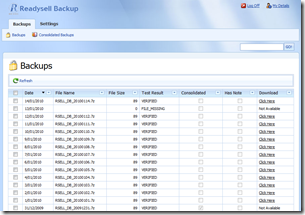
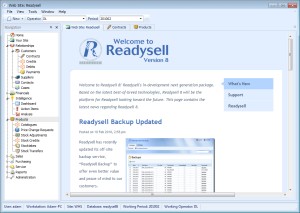
ReadysellBackup ScreenshotReadysell has recently updated its off-site backup service, “Readysell Backup” to offer even better value and peace of mind to our customers.

The service has been updated to include fully automated testing and daily alerts for failed backups, automated monthly consolidation and reporting as well as a new web interface to easily access past backup statuses and to download backups back to your site.

If you are a Readysell Backup user, you can access the portal using your existing username/password at https://backup.readysell.com.au. If you have lost your username/password, please contact adam@readysell.com.au to have it reset.

As has always been the case, this service is an optional addition to your regular Readysell licensing and is fully automated and managed by Readysell. If you are interested in Readysell Backup, please contact Greg for more information.

Readysell-Office Brands Integration User Guide

We have now completed our comprehensive documentation for the Readysell-Office Brands Integration and it is available for download on the Support Downloads area of the Readysell web site. The user guide covers all of the interactions between Readysell and WebSphere, how to set up your customers, the various modes of operation available to you as well as technical aspects.

Please review the documentation if you have any queries about RObI or how to use Readysell effectively in conjunction with WebSphere. If you have any questions or suggestions, please email Adam to have the clarifications or amendments added to the document.

RObI Update

A couple of months ago, we introduced you to RObI – the Readysell/Office Brands Interface. Today, I’d like to send a quick update to ensure you are aware of what RObI is doing.

RObI is importing customer orders from WebSphere into Readysell

When a customer places an order on your WebSphere site, WebSphere send that order directly to RObI and this is saved as a “SALWEB” or “SALHLD” in your Readysell automatically. Once this is done, you can review the order and continue processing it as normal. There is also an option to automatically print picking slips when the orders arrive in your system.

RObI is uploading customer invoices to WebSphere

When you create an invoice for a customer with a Web ID defined, the invoice will be automatically uploaded to WebSphere and the customer will be able to view it when they log into their account.

RObI is uploading your store (non-catalogue) products and prices to WebSphere

Every night, RObI will upload any new or updated store products to WebSphere. You can choose to show or remove a product by toggling the “Display on Website” flag in Readysell. You can get a report with a list of these products by following the instructions we supplied earlier.

If any of the functionality covered is not working for you, please contact us so that we can investigate the issue.

In the coming weeks, RObI will also be able to upload your Readysell contract prices to WebSphere. I will cover this in more detail once we are ready to start piloting this new feature.

Mass Updating Contract Price End Dates

We are currently testing the ability to mass update the ends dates of contract prices at a number of sites. We have composed a document covering this new functionality that can be accessed at our Support Downloads site. If you are interested in receiving this functionality before the end of the year, please contact us and we will arrange an accelerated deployment. Otherwise, the new functionality will be made available as part of a regular Readysell release early next year.

Categorising Your Store Products

You may have noticed that your non-catalogue website products are all piling up in a folder called “Store Products” on your WebSphere site. This is the default folder for your non-catalogue products. If you are happy with this arrangement, you are welcome to leave all your products as they are, however, if you want to place your products (or a subset of your products) inside another category instead, this is available.

Firstly, you must find the lowest level WebSphere category. This may be a catalogue category, or a category you created yourself. To find the lowest level category, you can simply navigate through your WebSphere site until there are no more subcategories. In the example below, “Duracell Batteries” is the lowest level category.

Lowest Level Category

Once you have found this category, copy its name and open up the relevant product in Readysell. Go to the “Notes 2” tab and then paste the category name into the “Category” field. If there is any other data in the “Sub Category” fields, remove it.

Product Screen

Once you are done, click “OK”. Your product should be moved to the new category overnight.

Season’s Greetings from Readysell

imageAs the holiday season approaches, the management and staff at Readysell would like to thank their valuable customers for the ongoing support over the last year and wish you a very Merry Christmas and a safe and happy New Year.

The Readysell office will be closed from the 23rd of December, 2009 and business will resume on the 4th of January, 2010. As per our regular after hours service, Greg and John will be available during this period for critical support issues only.

We will continue to provide you with the very best service in the coming year to help you reach each of your business goals. We would especially like to send out a warm welcome to our new customers this year, welcome to the Readysell family. We hope that your transition to Readysell has been painless and we have made your business more effective.

Finally, thank you to all of our customers, new and old, for your ongoing business, thoughtful feedback and continued support. It’s been a pleasure dealing with each of our customers and we hope that the great business relationships we have started and built upon will continue to serve all parties and help our businesses prosper in the new years.

Greg, John, Adam, Diane, Dianne, Sharon and Sue

Readysell 7 Release Summary – 26th of November, 2009

This is a summary of the full release document available in the Release Notes folder of the Support Downloads site. The full document includes a more detailed description of the various changes including screenshots.

Fixes

  • Corrected bind error message that displayed when printing single return advice reports from the Browse Return Advices window.
  • Corrected problem where WebSphere order imports that are repriced when received into Readysell picked up contract prices but could miss Government price levels.
  • Corrected problem where negative pack and retail breaks could cause cost errors on purchase orders.
  • Corrected problem where turning the WebSphere interface on could cause an error message to display when invoicing orders.
  • Corrected bug where auto invoice of one invoice per order customers did not split orders across sites.
  • Corrected bug where a sale could end up with no site in some very unusual situations involving changing a serial number in the middle of a sale.
  • Corrected bug where query wizard did not work properly on some Browse windows (i.e. Customer Browse, Products Browse, Suppliers Browse).
  • Corrected bug where custom column sort could cause an error message “bind error” on some browse windows.
  • Corrected bug in WebSphere import where importing a WebSphere order at the same time as entering a manual order could damage the orders.
  • Corrected a number of “binding” error messages introduced while building the new WebSphere integration features (those features were for ON and OPD stores only).

New Features

  • The Change A Site On Sales button does not allow you to change sites if the customer is a one invoice per order customer. Doing so can cause problems as the one invoice per order process needs all the sales in a set to be at one site.
  • Added the ability to limit web imports to particular computers. All computers create a system reference if it does not exist. It defaults to having a value of 1 which enables importing on that computer.
  • Added a system reference type ‘INVOICE’, code ‘PRINT-ALL-BACK-ORDERS-ALL-TRANSCODES’. If the value is 1, then outstanding back orders for the customer print on both invoices and picking slips.
  • We are about to implement an automated upgrades status email for customers. Periodically we (Readysell) will be able to send an email to all members letting them know the status of their Readysell upgrades, Catalogue loads, Image updates and Report updates.
  • We are currently deploying new features to test sites to support Phase II integration with WebSphere. A notification and tracking system exists on the main menu and throughout Readysell to allow you to track the status of your WebSphere integration.
  • Interface to IFS (Interactive Freight Systems) automated freight management system. The Readysell consignment notes module can now automatically connect to the IFS freight management system.

[Click here to download the full release notes]

“Display on Web Flag”: The Saga Continues

In the previous updates, we had asked Office Brands members to manually update all products that they want to display on the website with the “Display on Web” flag. We have had some feedback and we realise that this is not feasible in all cases as there may often be large amounts of store products to be uploaded.

As such, we are providing an option to upload all of your store products to WebSphere initially, giving you the option to then remove products you do not want to display. The system automatically detects catalogue products and these will never be uploaded (as they are already available on the web courtesy of Office Brands Head Office).

The end result is that the only action that will be required on your part will be removing any existing products from WebSphere. Greg or Sue will be calling you to discuss the entire process when we are ready to begin.