Please see “Correction: Australian Office / Edwards Dunlop Product Updates” for updated information.
Interruption to power supply at Readysell offices
Due to a planned power outage at Readysell’s Milperra office, Readysell support will be operating in a reduced capacity for a 1-2 hour period between 8am and 3pm today. During this period we will be attending to critical or emergency level issues only.
For up to date information, please monitor our Twitter feed at https://twitter.com/readysell
Upcoming free training webinars
Many Office Brands dealers have participated in and made tangible improvements in their business through Readysell’s free webinar training program. We are running some more training sessions soon and would like to invite all dealers to participate.

Please consider whether any members of your team would be able to attend any of the following sessions. Be sure to register so that we can ensures you are correctly set up prior to the session starting.
Managing dead stock and increasing your margins
This is a repeat of the program held earlier this month for anyone who was unable to attend.
- Monday 31/10/2016 1pm – 2pm Sydney time | Register Here
- Thursday 10/11/2016 1pm – 2pm Sydney time | Register Here
Managing your contract prices
- Thursday 17/11/2016 1pm – 2pm Sydney time | Register Here
- Thursday 24/11/2016 1pm – 2pm Sydney time | Register Here
Dynamic Supplies Sydney warehouse now available in RS3
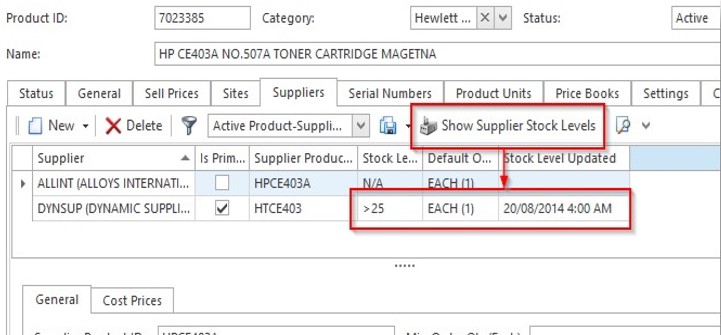
Readysell 8 customers enjoying the benefit of the Readysell Supplier Stock Service (RS3) to lookup live stock data are now able to view stock availability from Dynamic Supplies’ new Sydney warehouse. From your Readysell product screen, simply click the “Show Supplier Stock Levels” button and Readysell will show you up to date availability information for that product.
The new feed adds to data from a number of other suppliers, including Pelikan Artline, Alloys, Stationers Supply, Satex Distributors, WA Stationery and V Wholesale. Readysell is continuing to grow its list of industry integration partners for both electronic ordering and supplier stock integration. We’ll keep you posted as we introduce new integration partners.

If you have any questions or require assistance getting started with the new integration features, please feel free to contact our support team.
Keep your skills up to date with our free monthly training webinars
Over twenty Office Brands dealers have participated in Readysell’s new free monthly webinar training program. Every participant has told us they have learned something of practical use in their business from the sessions. Many dealers have made tangible improvements in their business such as reducing dead stock, improving margin by managing price updates and improving customer service by spotting contracts that have expired.
“I applied the webinar training immediately. I found some product pricing issues that had been costing me money and fixed contracts that were not performing for my customers. There were two or three lightbulb moments in the first session”
– Geoff Kindred, Express Office National
“Yet another excellent Readysell training program that I am very pleased to be part of. I am now controlling my dead stock better and have a lot of home work improving other aspects of my business”
– Anthony Semmler, Principal, Office National Barossa
“I’ve learned so much and my business has definitely benefited from the training”
– Ajay Amin, Principal, Ezi Office Supplies
Some of the recent and planned free training sessions include:
- Improving profit by better monitoring of pricing and contracts
- Improving profit and sales with contracts
- Improving the value of your business by cleaning your database
- Understanding your sales with analysis and DIFOT reporting
Readysell’s free webinar training will benefit your business. Contact us for reserve a spot in any of our upcoming sessions. Members of our team will also be attending the Office Brands EXPO in Melbourne this weekend. Please drop by and visit us at the Office Brands stall on the show floor on Saturday, or come speak with one of our Subject Matter Experts on Sunday.
Office Brands dealers benefit from joint technology mentoring program
Office Brands, Toni Glass Consulting, Geoff Kindred of Express Office National and Readysell have partnered to deliver the first Office Brands Technology Mentoring program over eight weeks.
Geoff Kindred and Toni Glass led the presentations, focusing on real benefits from a dealer perspective. We have received glowing feedback from all of the participants. During the program we help dealers to get real business benefits from the available technologies using a weekly webinar and individual follow up tutoring. Toni Glass is also running follow up sessions to help participants plan and monitor the real business benefits of the mentoring program.
Ritesh Patel, Chief Information Officer at Office Brands states “Office Brands will run the mentoring program three times a year to help dealers get the most out of Office Brands’ and Readysell’s technologies”. Please ensure you are subscribed to and review upcoming Office Brands broadcasts to learn about how you can be involved with the next round of sessions.
“I was amazed at just how fast Readysell responded. I asked for something one week and the next week it would just be there”
– Nicole Keeffe, Manager, Office National Kununurra
“Readysell’s commitment to follow up every session by personally calling every participant, every week was excellent”
– Toni Glass, Toni Glass Consulting (pictured)
Important changes to stock allocation
We have made some changes to stock allocation to prevent occasional errors that occurred when stock that had been shipped was reallocated.
Previously, stock remained allocated on sale order lines, even when a shipment had been released. Now, stock allocated on sale orders and sale shipments will clear as soon as a sale shipment is in progress for that sale order line.
The reason for this change is that there could be a mix up between stock allocated on sale orders and stock on sale shipments. Now if stock is shipped it no longer shows as allocated. When stock is shipped, the quantity allocated is cleared and appears in the quantity shipped column instead. The percent fully allocated for the line goes to zero. See worked example below.
When order is placed:
- Sale order quantity 10
- Quantity allocated 8
- Quantity on shipments 0
- Quantity on back order 2
When sale shipment for 8 is released:
- Sale order quantity 10
- Quantity allocated 0
- Quantity on shipments 8
- Quantity on back order 2
The most obvious changes are:
- The quantity fully allocated may go to zero for a sale order when the sale has a shipment, even if the shipment is not posted
- The quantity allocated on a sale order line may go to zero when the sale order line has a shipment
We’ve updated our documentation at https://readysell.atlassian.net/wiki/x/H4A9BQ should you require more information about this change. If you have any further questions, please contact Readysell Support.
Readysell 8.37: Sprinkled with goodness
Over the last couple of weeks we’ve been continuing our campaign to make Readysell easier for you to use and to put valuable business insights at your fingertips. With Readysell 8.37, now rolling out to all of our Readysell 8 customers, we’re glad to be delivering more of these improvements. There’s still more to do, so you can look forward to similar improvements in the releases to follow.
What’s new?
With this release, you’ll notice various goodies sprinkled across the system. Here’s just a few of the changes we’ve made:
- Added useful fields to the default sales and purchasing screen layouts
- Added highlighting to GP% and margin values on sales when they fall below configured thresholds
- Added a “Open in Browser” button when viewing help pages in Readysell
- Added new filters and a “Difference” column to the Product Import Audit screen
- Introduced some new actionable metrics
- Added a new “Sales by Period” report
- Added an option for “Monday to Saturday” in the operating days for supplier cards
Questions or comments?
Our documentation has been updated to reflect the latest changes, but we know that it can be tough to wrap your head around what’s new and how it affects you. Please open a ticket through our Support Centre and we’ll be happy to help you out.
Readysell 8.36: Faster than lightning
What? Already you say? Yes, we know it’s only been 2 weeks, but Readysell 8.36 is now rolling out to all of our Readysell 8 customers. In this release we continue our focus on making it easier for you to use Readysell and putting valuable business insights at your fingertips. And don’t worry, we’re not done yet. You can look forward to similar improvements in the releases to follow.
Identify and target areas to improve with actionable metrics
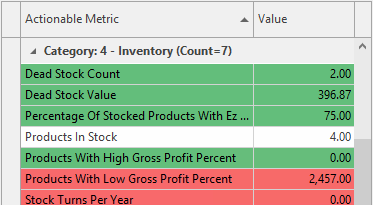
We’ve recently compiled a number of key metrics that each dealer can use to gauge how their business is performing against similar dealers in the Office Brands group. In this release, we’re putting a number of those metrics at your fingertips by showing them on the Management Dashboard. We’ve colour coded each metric so you can spot if you’re falling behind, and you can even double click to get some advice on how to improve.
Quickly identify dead stock and lapsed/inactive customers
Clearing out dead stock and re-engaging lapsed or inactive customers are two key ways you can use the data in your system to improve the profitability of your business. To make things easier, we’ve added tailored view variants for these key scenarios. On the product list view, select the “Dead Stock” variant and on the card list view, select the “Customer Lapsed and Inactive” variant to get started.
Navigate around effectively and never miss a detail with our latest UI tweaks
We’ve observed that some of the most effective users of Readysell customise the user interface of their system to help them constantly improve their data and business processes. We are collaborating with these users to distil their changes into improvements that apply to and can be distributed to all Readysell users. In this release, we’ve started integrating some of these changes. You’ll notice that we’ve moved some tabs around based on common usage, we’re highlighting certain fields for emphasis and we’ve added colour-coding where it makes sense. We’ve done our best to merge these changes with any existing customistations you have, but in some cases your customisations may be lost. If that’s the case, you may need to re-create your customisations. We promise it will be worth it. We’d love to hear your feedback as we continue to make improvements in this area going forward.
Questions or comments?
Our documentation has been updated to reflect the latest changes, but we know that it can be tough to wrap your head around what’s new and how it affects you. Please open a ticket through our Support Centre and we’ll be happy to help you out.
Readysell 8.35: Going for gold*
We’re pleased to announce that Readysell 8.35 is now rolling out to all of our Readysell 8 customers. This release addresses some common customer requests and kicks off a series of releases that will be focused on making it easier for you to use Readysell and putting valuable business insights at your fingertips.
Benchmark warehouse efficiency with improved DIFOT reports
Delivered In-Full, On-Time (DIFOT) reporting is a great way to measure how effectively you are fulfilling your customer’s orders. This this latest release we’ve created 2 new DIFOT reports, one that only measures catalogue products and another that looks only at lines that were contracted to the customer. This allows you to get an accurate picture of how you perform on products you typically expect to have in stock in your warehouse (rather than the extended range, which you may often have to back order or drop ship). For customers opted into Office Brands BI, we’re also uploading this data to allow reporting and analysis across dealers. This is one report you should be using. Please give us a call if you need some help on how to run it. Remember, support calls to Readysell that take less than 15 minutes are free.
Maintain a professional image with statement and invoice improvements
We’ve incorporated a range of customer feedback into our customer statement and tax invoice layouts to enable you to hide redundant details, change colours, show site-specific contact details to specific customers and use a wider range of logo graphics. If you’re using our standard layouts and would like to make customisations, please get in touch with us and we can discuss what’s now possible within the standard layouts. Otherwise, a support team member will be calling all our customers that are not currently using the standard reports or statements and will be helping you make the change to those best practice reports.
Get to what you need quicker with user interface tweaks
Starting with Readysell 8.35 and continuing over the next few versions we will be working on improving the user interface in some key areas. In this release we’ve made it easier to access relevant back orders from the sales and purchasing screens, added a centralised view of service calls and improved the usability of Readysell when using keyboard only on drop downs. Take the time to look at those changes. Just the improved back order access could save your team time every day.
Tidy up clutter with product category archiving
Because Readysell uses product categories across the product for many purposes (including reporting, contracts and GL interface), it’s not always possible to simply delete a category after it has already been used. That said, customers have mentioned that sometimes they have categories that they don’t want to use anymore. We’ve added an “Archive” flag to categories that will allow you to block such categories from being used on any products to address this.
Questions or comments?
Our documentation has been updated to reflect the latest changes, but we know that it can be tough to wrap your head around what’s new and how it affects you. Please open a ticket through our Support Centre and we’ll be happy to help you out.
Please sir, I want some more…
We’ve also made a number of other improvements and under-the-hood changes. Here’s a full list. If you’d like more details about any of the below items, please don’t hesitate to get in touch with us through our Support Centre .
- 11246 Add an optional popup to show customer back orders
- 11274 Add support for recording coverage and average on machines from FMAudit
- 11323 Allow for product categories to be archived
- 11357 Allow any arbitrary field from the source object to be added to Action Items
- 11580 Show Source Record from outstanding Sales Orders within Purchase Run
- 11666 Framework improvement – Drop-down boxes
- 11807 Improve handling of ABA files for multiple sites
- 11838 Improve DIFOT reporting
- 11878 Service Calls Filter or List view
- 12159 Allow site details to change on statement
- 12202 Allow for splitting up of card and contacts for BI by site
- 12302 Improve tax invoice/adjustment note layouts
- 12304 Improve customer statement of account layouts
* Totally nothing to with the international sporting event that is currently occurring in the South American geographical region.